
Webhooks
Event types
Section titled “Event types”ChargebackStop currently supports ten types of webhook events:
alert.createdalert.updatedenrolment.createdenrolment.updatedrepresentment.createdrepresentment.updatedscheme_notice.createdscheme_notice.updatedlookup.createdlookup.updated
Adding webhook endpoints
Section titled “Adding webhook endpoints”In the partner dashboard
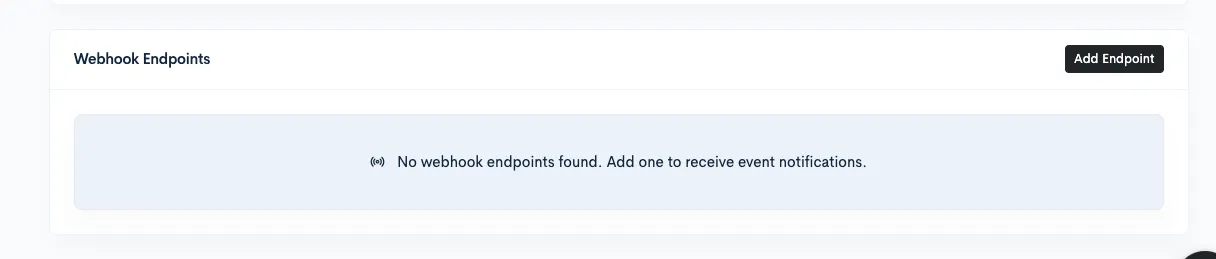
Section titled “In the partner dashboard”To add a webhook endpoint, go to the Partner settings page and click “Add Endpoint” in the section at the bottom of the page.
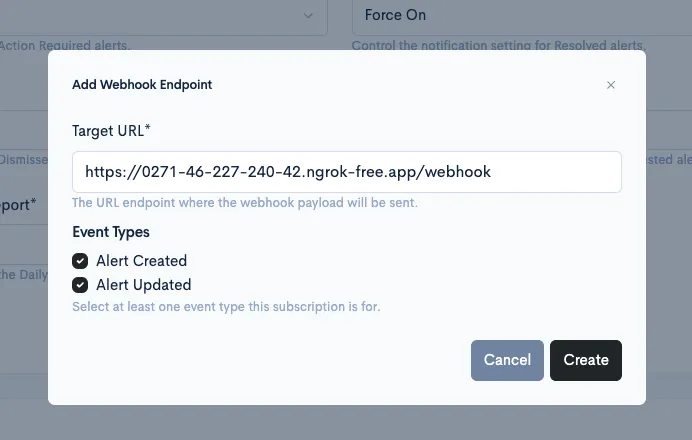
In the modal window, enter the URL ChargebackStop should send events to, and select the event types you want to receive.
Once the endpoint is saved, it appears in the table at the bottom of the page. You can use the eye icon to reveal the webhook secret that the ChargebackStop platform uses to sign webhooks.

In the organisation dashboard
Section titled “In the organisation dashboard”Open your ChargebackStop dashboard, then select “Settings” from the left-hand menu. From the tabs at the top, pick “Webhooks”.
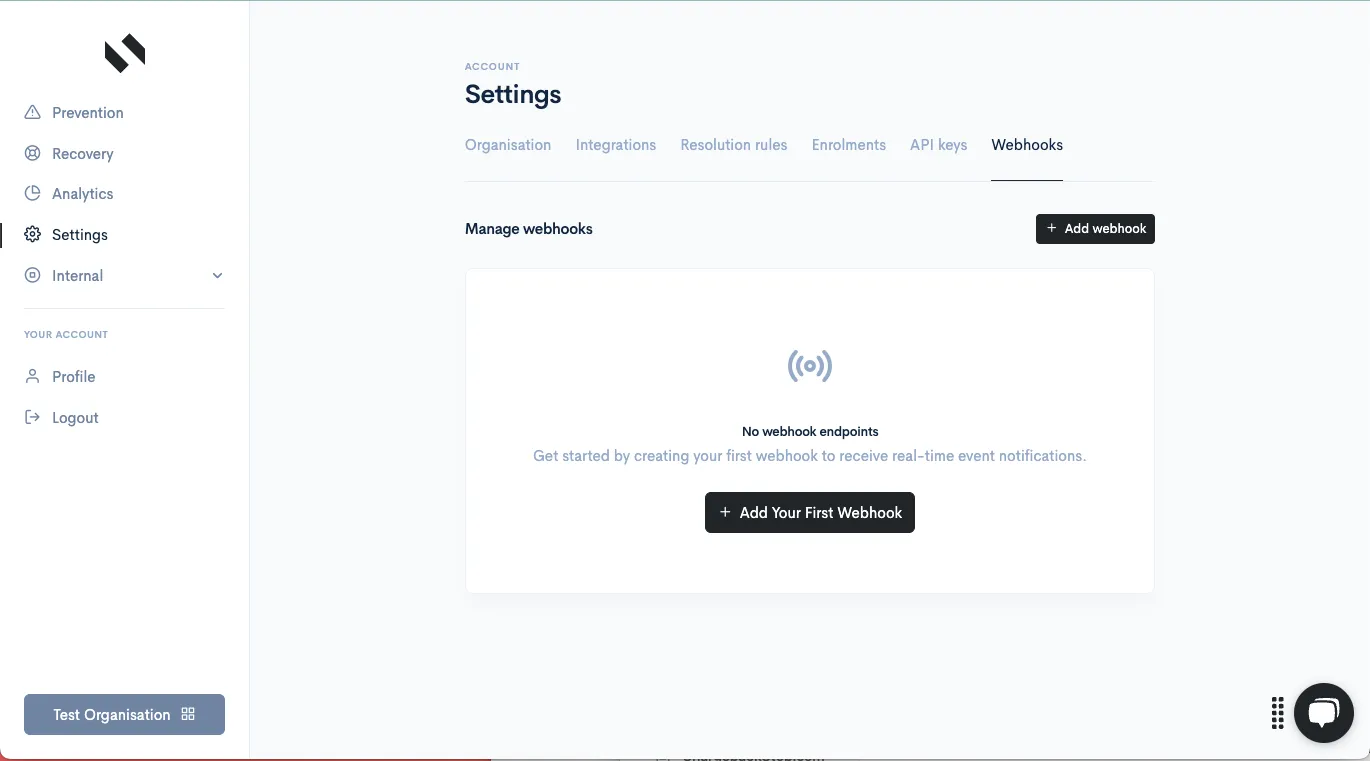
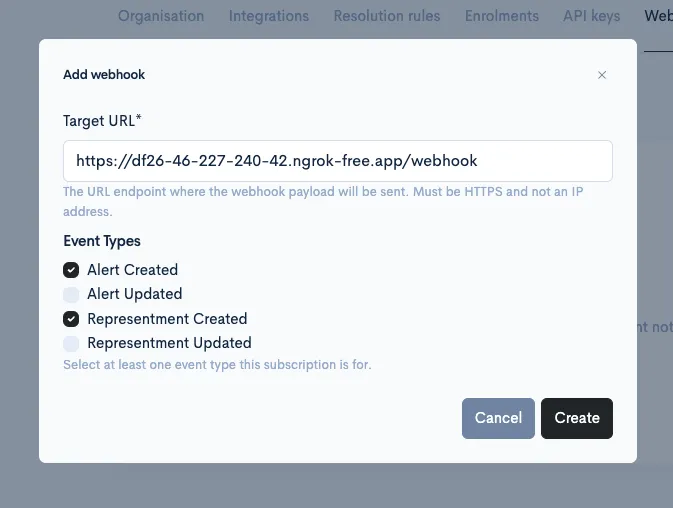
To add a webhook, click the “Add webhook” button and fill in the form with your endpoint URL and the events you want to receive.
Once the endpoint is saved, it appears in the table at the bottom of the page. You can use the eye icon to reveal the webhook secret that the ChargebackStop platform uses to sign webhooks.
Delivery mechanism
Section titled “Delivery mechanism”Request Details
Section titled “Request Details”- The payload will be a JSON object (see below for details).
- We include an
X-Signatureheader, which is an HMAC-SHA512 hash of the timestamp and payload, allowing you to verify request authenticity. The signing secret is unique to your webhook subscription. - We include an
X-Idempotency-Keyheader with the unique delivery ID. - We expect a successful HTTP response (2xx status code) within 20 seconds.
Reliability and retries
Section titled “Reliability and retries”- If the initial delivery attempt fails (e.g., due to a network error or a 4xx/5xx response from your server), we automatically retry delivery.
- Our retry strategy includes 5 attempts over approximately 2 days, with increasing delays between attempts: 1 minute, 5 minutes, 30 minutes, 2 hours, and finally 12 hours.
- Retries for the same delivery keep the same X-Idempotency-Key value (the delivery ID). The header helps prevent processing duplicate deliveries. To ensure you process each event only once, rely on the event ID from the payload (
id), which stays the same across retries of that event.
- Retries for the same delivery keep the same X-Idempotency-Key value (the delivery ID). The header helps prevent processing duplicate deliveries. To ensure you process each event only once, rely on the event ID from the payload (
- If all retries are exhausted and the delivery remains unsuccessful, the delivery will be marked as FAILED.
- If multiple delivery attempts to a given endpoint start failing, the system will automatically disable the webhook endpoint due to poor health.
Signature
Section titled “Signature”To ensure webhook security and authenticity, we include a unique signature with each request. This signature allows you to verify that the webhook originated from us and that its payload was not tampered with in transit.
-
How the X-Signature header is generated
- Timestamp: We take the current Unix timestamp (the number of seconds since January 1, 1970 UTC). This timestamp is included directly in the signature header.
- Payload: This is the raw JSON body of the webhook request.
- Concatenation: We create a string by concatenating the timestamp, a period (.), and the UTF-8 decoded payload. For example: "{timestamp}.{payload_string}".
- HMAC-SHA512: We then use your unique webhook secret (provided to you when you set up the webhook subscription) to create an HMAC of the concatenated string using the SHA512 hashing algorithm.
- Hex Digest: The resulting HMAC is encoded into a hexadecimal string.
- Formatted signature: Finally, the signature is formatted as
t={timestamp},v1={hex_digest}.
Notes on the formatted signature:
t={timestamp}: Unix timestamp when the signature was generated. You can compare this with your current time and discard webhooks that are too old to help prevent replay attacks. We recommend tolerating reasonable clock skew (e.g., a few minutes) between your servers and ours.v1={hex_digest}: Signature scheme version (currentlyv1) followed by the hexadecimal HMAC-SHA512 digest.
-
How to verify a received signature
- Verify the timestamp (
t=): Extract the timestamp from theX-Signatureheader and compare it with your current server time. If the difference is too large (outside your acceptable tolerance for clock skew and message delivery times), you may choose to discard the request. - Verify the signature (
v1=): If the timestamp is acceptable, construct the signature string on your end:- Use the timestamp from the
t=part of the receivedX-Signatureheader. - Use the raw request body as the payload.
- Concatenate them: "{timestamp_from_header}.{raw_request_body}".
- Calculate the HMAC-SHA512 hash of this concatenated string using your webhook secret.
- Convert the hash to its hexadecimal representation.
- Compare this generated signature with the
v1=value from the receivedX-Signatureheader. They must match exactly.
- Use the timestamp from the
If the timestamp is recent enough and your generated signature matches the one provided in the header, you can be confident the webhook is genuine, untampered, and not a replayed request.
- Verify the timestamp (
JavaScript signature verification function
Section titled “JavaScript signature verification function”import crypto from 'crypto';
/** * Verify a webhook signature. * * @param {string} rawBody – the exact request body * @param {string} signatureHeader – the entire value of the x-signature header * @param {string} secret – your webhook signing secret * @throws {Error} on any verification failure */function verifySignature(rawBody, signatureHeader, secret) { if (!secret) { throw new Error('Missing webhook secret'); } if (!signatureHeader) { throw new Error('Missing signature header'); }
// e.g. "t=1618884471,v1=abcdef123456…" const parts = signatureHeader.split(','); let timestamp = null; let receivedSig = null;
for (const part of parts) { const [key, val] = part.split('='); if (key === 't') { timestamp = val; } else if (key === 'v1') { receivedSig = val; } }
if (!timestamp) { throw new Error('Signature header missing timestamp (t)'); } if (!receivedSig) { throw new Error('Signature header missing signature (v1)'); }
// Enforce 5 minute tolerance const sentTime = Number(timestamp); if (Number.isNaN(sentTime)) { throw new Error('Invalid timestamp in signature header'); } const now = Math.floor(Date.now() / 1000); const FIVE_MINUTES = 5 * 60; if (Math.abs(now - sentTime) > FIVE_MINUTES) { throw new Error('Timestamp is outside the allowed 5 minute window'); }
// Compute expected HMAC const payload = `${timestamp}.${rawBody}`; const expectedSig = crypto .createHmac('sha512', secret) .update(payload) .digest('hex');
const receivedBuf = Buffer.from(receivedSig, 'hex'); const expectedBuf = Buffer.from(expectedSig, 'hex'); // Protect against timing attacks if (receivedBuf.length !== expectedBuf.length || !crypto.timingSafeEqual(receivedBuf, expectedBuf)) { throw new Error('Invalid signature'); }
// All checks passed return true;}PHP signature verification function
Section titled “PHP signature verification function”/** * Verify a webhook signature. * * @param string $rawBody The exact request body * @param string $signatureHeader The value of the X-Signature header * @param string $secret Your webhook signing secret * * @throws Exception on any verification failure */function verifySignature(string $rawBody, string $signatureHeader, string $secret) : bool{ if (empty($secret)) { throw new Exception('Missing webhook secret'); } if (empty($signatureHeader)) { throw new Exception('Missing signature header'); }
// Split header like "t=1618884471,v1=abcdef123456…" $parts = explode(',', $signatureHeader); $timestamp = null; $receivedSig = null;
foreach ($parts as $part) { [$key, $val] = array_pad(explode('=', $part, 2), 2, null); if ('t' === $key) { $timestamp = $val; } elseif ('v1' === $key) { $receivedSig = $val; } }
if (null === $timestamp) { throw new Exception('Signature header missing timestamp (t)'); } if (null === $receivedSig) { throw new Exception('Signature header missing signature (v1)'); } if (! ctype_digit($timestamp)) { throw new Exception('Invalid timestamp in signature header'); }
// Enforce 5 minute skew $sentTime = (int) $timestamp; $now = time(); if (abs($now - $sentTime) > 5 * 60) { throw new Exception('Timestamp is outside the allowed 5 minute window'); }
// Compute expected signature $payload = $timestamp . '.' . $rawBody; $expectedSig = hash_hmac('sha512', $payload, $secret);
// Timing-safe comparison if (! hash_equals($expectedSig, $receivedSig)) { throw new Exception('Invalid signature'); }
return true;}Python signature verification function
Section titled “Python signature verification function”import hmacimport hashlibimport time
def verify_signature(raw_body: bytes, signature_header: str, secret: str) -> None: if not secret: raise ValueError('Missing webhook secret') if not signature_header: raise ValueError('Missing signature header')
parts = dict(p.split('=', 1) for p in signature_header.split(',') if '=' in p) t = parts.get('t') v1 = parts.get('v1')
if t is None: raise ValueError('Signature header missing timestamp (t)') if v1 is None: raise ValueError('Signature header missing signature (v1)') if not t.isdigit(): raise ValueError('Invalid timestamp in signature header')
ts = int(t) now = int(time.time()) FIVE_MINUTES = 5 * 60 if abs(now - ts) > FIVE_MINUTES: raise ValueError('Timestamp is outside the allowed 5 minute window')
payload = f'{t}.{raw_body.decode("utf-8")}'.encode('utf-8') expected = hmac.new(secret.encode(), payload, hashlib.sha512).hexdigest()
if not hmac.compare_digest(expected, v1): raise ValueError('Invalid signature')Payloads
Section titled “Payloads”Webhook payload contains the following fields:
id- unique event ID.type- event type, currently one ofalert.created,alert.updated,enrolment.created,enrolment.updated,representment.created,representment.updated,scheme_notice.created,scheme_notice.updated,lookup.created, orlookup.updated.created_at- date and time of when event was created.data- object containing the main body of the event.object- a snapshot of the entity the webhook was generated for. For alert events it matches the alert object from the API (https://api.chargebackstop.com/v1/docs#/Alerts/src_api_alerts_get_alerts); representment and scheme notice events follow their corresponding public event payload schemas.previous_attributes- present only in ‘updated’ events, contains a list of fields that changed and their previous values.
Examples
Section titled “Examples”Sample alert.created payload. data→object body matches the alert object from the API (https://api.chargebackstop.com/v1/docs#/Alerts/src_api_alerts_get_alerts).
x-signature: t=1746901125,v1=71d294712c109472c92e6afc2f0fcafce611bda73ba027f7221f8910d37b29de6fdd65489d28b28678c74d3ea62edb76f13631286d661833b0c4d4880be4d2bax-idempotency-key: whdl_CXwgJJye6EoZYxtFbx78Q{ "id": "evt_dbXKdyUWLzSP98HMVdoFW", "type": "alert.created", "created_at": "2025-05-10T18:17:35.635870+00:00", "data": { "object": { "id": "netalrt_yxMihZ4JhB7h5unn36F18", "note": null, "status": "ACTION_REQUIRED", "created_at": "2025-05-10T13:56:56.312045Z", "updated_at": "2025-05-10T13:56:58.111532Z", "merchant_id": "mrch_YoaBvAq2H2R8JYXjXodkE", "merchant_ids": ["mrch_YoaBvAq2H2R8JYXjXodkE"], "enrolment_type": "ETHOCA_ALERT", "organisation_id": "org_RoExcMDGGjmmGXKxAUAkR", "transaction_card_bin": null, "chargeback_reason_code": null, "transaction_card_last4": "5455", "transaction_network_id": null, "transaction_card_issuer": "BofA", "transaction_card_scheme": "MASTERCARD", "action_required_deadline": "2025-05-12T13:56:56.300274Z", "transaction_authorised_at": "2025-05-05T13:56:56.300274Z", "transaction_currency_code": "USD", "transaction_refund_outcome": null, "subscription_cancel_outcome": null, "transaction_amount_in_cents": 6606, "transaction_authorisation_code": "7XP81U", "transaction_statement_descriptor": "ECOM-STUFF.COM", "transaction_acquirer_reference_number": "012533471273304331125644612", "integration_id": "int_ZSHVZukGYs5SdVcwkEZrL", "integration_transaction_id": "pi_3SPJO4KRFSLReU4y04XJUvLN" } }, "api_version": "v1"}Sample alert.updated body. Please note the previous_attributes object.
x-signature: t=1746901218,v1=5ef9423caa3366f28eaf2411c3c3b3b6d660ddcc1a03c190ac124038e04d927bcbaae622f21c011feb27a9bae1ad96da4f74407cb1533ba1cdf8c0d8e1733b37x-idempotency-key: whdl_ghRygm8zYiHD4vjNSQ9uT{ "id": "evt_NUpgzGLGJTj5j1MZ6jb1d", "type": "alert.updated", "created_at": "2025-05-10T18:20:18.430390+00:00", "data": { "object": { "id": "netalrt_yxMihZ4JhB7h5unn36F18", "note": null, "status": "RESOLVED", "created_at": "2025-05-10T13:56:56.312045Z", "updated_at": "2025-05-10T18:20:18.419298Z", "merchant_id": "mrch_YoaBvAq2H2R8JYXjXodkE", "merchant_ids": ["mrch_YoaBvAq2H2R8JYXjXodkE"], "enrolment_type": "ETHOCA_ALERT", "organisation_id": "org_RoExcMDGGjmmGXKxAUAkR", "transaction_card_bin": null, "chargeback_reason_code": null, "transaction_card_last4": "5455", "transaction_network_id": null, "transaction_card_issuer": "BofA", "transaction_card_scheme": "MASTERCARD", "action_required_deadline": "2025-05-12T13:56:56Z", "transaction_authorised_at": "2025-05-05T13:56:56Z", "transaction_currency_code": "USD", "transaction_refund_outcome": "REFUNDED", "subscription_cancel_outcome": null, "transaction_amount_in_cents": 6606, "transaction_authorisation_code": "7XP81U", "transaction_statement_descriptor": "ECOM-STUFF.COM", "transaction_acquirer_reference_number": "012533471273304331125644612", "integration_id": "int_ZSHVZukGYs5SdVcwkEZrL", "integration_transaction_id": "pi_3SPJO4KRFSLReU4y04XJUvLN" }, "previous_attributes": { "status": "ACTION_REQUIRED", "transaction_refund_outcome": null } }, "api_version": "v1"}Enrolment webhooks (enrolment.created, enrolment.updated)
Section titled “Enrolment webhooks (enrolment.created, enrolment.updated)”enrolment.createdis sent when a new enrolment is created.enrolment.updatedis currently emitted when an enrolmentstatuschanges or when its Ethoca alert descriptors change. Descriptor changes include adding or removing a descriptor, editing its text, changing itsmatch_type, or changing its networkstatus.- Appending descriptors through
PATCH /v2/enrolments/{enrolment_id}emitsenrolment.updatedwithprevious_attributes.ethoca_alert.descriptors. - This behavior is the current implementation and is not a strict long-term contract. Additional enrolment field changes may also emit
enrolment.updatedin the future. - Status updates performed through simulation tooling (for example,
PATCH /v1/simulate/enrolments/{enrolment_id}for TEST organisations) follow the same behavior and can emitenrolment.updated. - Enrolment webhook payloads are versioned as
api_version: "v2". - For update events,
data.previous_attributesmirrors the shape ofdata.objectand includes tracked fields with their previous values at event creation time. A descriptor change therefore appears asprevious_attributes.ethoca_alert.descriptors.
Sample enrolment.created payload.
{ "id": "evt_hxgqT7vA8am77QbJCMiFA", "type": "enrolment.created", "created_at": "2026-02-25T15:02:49.256560+00:00", "data": { "object": { "id": "enrl_pfNupxFzfYDaEf1UrD6wU", "organisation_id": "org_MSALEuBsAywqDA3SQVqc8", "merchant_ids": [ "mrch_XXiP48XqnnYbRvnUFVH6G" ], "type": "VERIFI_ORDER_INSIGHT", "status": "IN_PROGRESS", "created_at": "2026-02-25T15:02:49.256560Z", "updated_at": "2026-02-25T15:03:14.460982Z", "note": "" } }, "api_version": "v2"}Sample enrolment.updated payload. Please note the previous_attributes object.
{ "id": "evt_aXCsMEEaxP3Jvk9SmxBaQ", "type": "enrolment.updated", "created_at": "2026-02-25T15:05:31.102891+00:00", "data": { "object": { "id": "enrl_pfNupxFzfYDaEf1UrD6wU", "organisation_id": "org_MSALEuBsAywqDA3SQVqc8", "merchant_ids": [ "mrch_XXiP48XqnnYbRvnUFVH6G" ], "type": "VERIFI_ORDER_INSIGHT", "status": "ENABLED", "created_at": "2026-02-25T15:02:49.256560Z", "updated_at": "2026-02-25T15:05:31.083449Z", "note": "" }, "previous_attributes": { "status": "IN_PROGRESS" } }, "api_version": "v2"}An Ethoca descriptor change uses the same nested shape in previous_attributes:
{ "id": "evt_cRt7YbNqLm2Xw8FdKp3vJ", "type": "enrolment.updated", "created_at": "2026-02-26T09:14:02.551204+00:00", "data": { "object": { "id": "enrl_tQ9wKzPvHn4Bs2LmXcR7D", "organisation_id": "org_MSALEuBsAywqDA3SQVqc8", "merchant_ids": [ "mrch_XXiP48XqnnYbRvnUFVH6G" ], "type": "ETHOCA_ALERT", "status": "ENABLED", "ethoca_alert": { "descriptors": [ { "descriptor": "ACME-FIT", "match_type": "EXACT_MATCH", "status": "ACTIVE" } ] }, "created_at": "2026-02-20T11:41:07.204118Z", "updated_at": "2026-02-26T09:14:02.498771Z", "note": "" }, "previous_attributes": { "ethoca_alert": { "descriptors": [ { "descriptor": "ACMEFIT", "match_type": "STARTS_WITH", "status": "PENDING" } ] } } }, "api_version": "v2"}Sample representment.created event
{ "id": "evt_S4VJrD42E1mVRVuCeapmt", "type": "representment.created", "created_at": "2025-05-22T19:09:09.512272+00:00", "data": { "object": { "id": "rep_DenAQk14kzDmwKSJn7cU3", "created_at": "2025-05-22T19:09:09.495869Z", "managed_by": "PARTNER", "updated_at": "2025-05-22T19:09:09.496523Z", "disputed_at": "2024-11-19T00:00:00", "merchant_id": "mrch_bQXg83B18qgACnp5Y4qU8", "service_type": "ONLINE_SERVICES", "dispute_stage": "CHARGEBACK", "dispute_due_by": "2024-12-03T00:00:00", "dispute_reason": "SUBSCRIPTION_CANCELED", "dispute_schema": "MASTERCARD", "dispute_status": "OPEN", "organisation_id": "org_tmo8Dq484yRUiiAcJuRPd", "dispute_reason_code": null, "dispute_reference_id": null, "dispute_currency_code": "USD", "dispute_amount_in_cents": 4444, "transaction_reference_id": null, "transaction_currency_code": "USD", "transaction_amount_in_cents": 4444, "transaction_authorisation_date": "2024-11-12T00:00:00", "transaction_acquirer_reference_number": null } }, "api_version": "v1"}Sample representment.updated event
{ "id": "evt_2rzszUnkDUNFiBKqe6DdT", "type": "representment.updated", "created_at": "2025-05-22T20:14:51.041381+00:00", "data": { "object": { "id": "rep_wMxBaE4ivxQ7zvPy1dmNx", "created_at": "2025-05-22T19:08:25.245116Z", "managed_by": "PARTNER", "updated_at": "2025-05-22T20:14:51.004632Z", "disputed_at": "2024-11-19T00:00:00", "merchant_id": "mrch_bQXg83B18qgACnp5Y4qU8", "service_type": "ONLINE_SERVICES", "dispute_stage": "CHARGEBACK", "dispute_due_by": "2024-12-03T00:00:00", "dispute_reason": "SUBSCRIPTION_CANCELED", "dispute_schema": "MASTERCARD", "dispute_status": "LOST", "organisation_id": "org_tmo8Dq484yRUiiAcJuRPd", "dispute_reason_code": null, "dispute_reference_id": null, "dispute_currency_code": "USD", "dispute_amount_in_cents": 4444, "transaction_reference_id": null, "transaction_currency_code": "USD", "transaction_amount_in_cents": 4444, "transaction_authorisation_date": "2024-11-12T00:00:00", "transaction_acquirer_reference_number": null }, "previous_attributes": { "dispute_status": "OPEN" } }, "api_version": "v1"}Scheme notice webhooks (scheme_notice.created, scheme_notice.updated)
Section titled “Scheme notice webhooks (scheme_notice.created, scheme_notice.updated)”scheme_notice.createdis sent when a new scheme notice is created.scheme_notice.updatedis emitted when a tracked field on a scheme notice changes. Currently tracked fields are:is_revoked,notice_revoked_at,fraud_reported_at, andtransaction_purchase_date.- A
scheme_notice.updatedevent is only emitted after ascheme_notice.createdevent exists for that notice. - For update events,
data.previous_attributesincludes only the tracked fields that changed and their previous values. - Scheme notice webhook payloads are versioned as
api_version: "v1".
Sample scheme_notice.created payload.
{ "id": "evt_dbXKdyUWLzSP98HMVdoFW", "type": "scheme_notice.created", "created_at": "2026-03-01T10:30:45.123456+00:00", "data": { "object": { "id": "schntc_NFSPZDSTv3QgfU8GDhXKK", "organisation_id": "org_WVJ7aJzpT32FED9BqKPpM", "merchant_id": "mrch_bQXg83B18qgACnp5Y4qU8", "scheme_notice_type": "TC40", "notice_type": "FRAUD_NOTICE", "scheme": "VISA", "is_revoked": false, "notice_revoked_at": null, "fraud_reported_at": "2026-02-21T08:13:50.360977Z", "transaction_amount_in_cents": 14760, "transaction_currency_code": "USD", "transaction_card_bin": "411798", "transaction_card_last4": "3508", "transaction_merchant_name": "ECOM-STUFF OUTLET", "transaction_merchant_id": "274953873887879", "transaction_acquirer_reference_number": "77198913101798678449413", "transaction_authorisation_code": "96JNEP", "transaction_original_date": "2026-02-11T08:13:50.360977Z", "transaction_purchase_date": "2026-02-11T08:13:50.360977Z", "fraud_type": "CARD_NOT_PRESENT", "fraud_dispute_eligible": true, "created_at": "2026-03-01T10:30:45.123456Z", "updated_at": "2026-03-01T10:30:45.123456Z" } }, "api_version": "v1"}Sample scheme_notice.updated payload. In this example, the notice was revoked. Please note the previous_attributes object.
{ "id": "evt_NUpgzGLGJTj5j1MZ6jb1d", "type": "scheme_notice.updated", "created_at": "2026-03-01T12:00:00.541381+00:00", "data": { "object": { "id": "schntc_NFSPZDSTv3QgfU8GDhXKK", "organisation_id": "org_WVJ7aJzpT32FED9BqKPpM", "merchant_id": "mrch_bQXg83B18qgACnp5Y4qU8", "scheme_notice_type": "TC40", "notice_type": "FRAUD_NOTICE", "scheme": "VISA", "is_revoked": true, "notice_revoked_at": "2026-03-01T12:00:00.000000Z", "fraud_reported_at": "2026-02-21T08:13:50.360977Z", "transaction_amount_in_cents": 14760, "transaction_currency_code": "USD", "transaction_card_bin": "411798", "transaction_card_last4": "3508", "transaction_merchant_name": "ECOM-STUFF OUTLET", "transaction_merchant_id": "274953873887879", "transaction_acquirer_reference_number": "77198913101798678449413", "transaction_authorisation_code": "96JNEP", "transaction_original_date": "2026-02-11T08:13:50.360977Z", "transaction_purchase_date": "2026-02-11T08:13:50.360977Z", "fraud_type": "CARD_NOT_PRESENT", "fraud_dispute_eligible": true, "created_at": "2026-03-01T10:30:45.123456Z", "updated_at": "2026-03-01T12:00:00.541381Z" }, "previous_attributes": { "is_revoked": false, "notice_revoked_at": null } }, "api_version": "v1"}Scheme notice field definitions:
scheme_notice_type: TC15, TC40, or SAFEnotice_type: FRAUD_NOTICE or DISPUTE_NOTICEscheme: VISA, MASTERCARD, or OTHERfraud_reported_at: Date when the fraud was reportedfraud_type: Free-form string from the upstream network (e.g., CARD_NOT_PRESENT, STOLEN, COUNTERFEIT, ACCOUNT_TAKEOVER, etc.)fraud_dispute_eligible: Whether the fraud is eligible for a dispute
Lookup webhooks (lookup.created, lookup.updated)
Section titled “Lookup webhooks (lookup.created, lookup.updated)”lookup.createdis sent when a new digital receipt lookup is created (from Ethoca Consumer Clarity or Verifi Order Insight).lookup.updatedis emitted when a tracked field on a lookup changes. Currently tracked fields are:lookup_statusanddeflection_status.- A
lookup.updatedevent is only emitted after alookup.createdevent exists for that lookup. - For update events,
data.previous_attributesincludes only the tracked fields that changed and their previous values. - Lookup webhook payloads are versioned as
api_version: "v1".
Sample lookup.created payload.
{ "id": "evt_dbXKdyUWLzSP98HMVdoFW", "type": "lookup.created", "created_at": "2026-03-12T10:30:45.123456+00:00", "data": { "object": { "id": "lkup_NFSPZDSTv3QgfU8GDhXKK", "organisation_id": "org_WVJ7aJzpT32FED9BqKPpM", "enrollment_id": "enrl_pfNupxFzfYDaEf1UrD6wU", "type": "ETHOCA_CONSUMER_CLARITY", "parent_lookup_id": null, "lookup_status": "SUCCEEDED", "deflection_status": "NOT_ATTEMPTED", "transaction_card_bin": "411798", "transaction_card_last4": "3508", "transaction_arn": "77198913101798678449413", "transaction_auth_code": "96JNEP", "transaction_amount": 14760, "transaction_currency": "USD", "transaction_date": "2026-03-10T08:13:50.360977Z", "transaction_statement_descriptor": "ECOM-STUFF.COM", "transaction_network_id": null, "integration_id": "int_ZSHVZukGYs5SdVcwkEZrL", "integration_transaction_id": "pi_3SPJO4KRFSLReU4y04XJUvLN", "created_at": "2026-03-12T10:30:45.123456Z", "updated_at": "2026-03-12T10:30:45.123456Z" } }, "api_version": "v1"}Sample lookup.updated payload. In this example, the deflection status changed from PENDING to SUCCEEDED. Please note the previous_attributes object.
{ "id": "evt_NUpgzGLGJTj5j1MZ6jb1d", "type": "lookup.updated", "created_at": "2026-03-12T12:00:00.541381+00:00", "data": { "object": { "id": "lkup_NFSPZDSTv3QgfU8GDhXKK", "organisation_id": "org_WVJ7aJzpT32FED9BqKPpM", "enrollment_id": "enrl_pfNupxFzfYDaEf1UrD6wU", "type": "ETHOCA_FIRST_PARTY_TRUST", "parent_lookup_id": null, "lookup_status": "SUCCEEDED", "deflection_status": "SUCCEEDED", "transaction_card_bin": "411798", "transaction_card_last4": "3508", "transaction_arn": "77198913101798678449413", "transaction_auth_code": "96JNEP", "transaction_amount": 14760, "transaction_currency": "USD", "transaction_date": "2026-03-10T08:13:50.360977Z", "transaction_statement_descriptor": "ECOM-STUFF.COM", "transaction_network_id": null, "integration_id": "int_ZSHVZukGYs5SdVcwkEZrL", "integration_transaction_id": "pi_3SPJO4KRFSLReU4y04XJUvLN", "created_at": "2026-03-12T10:30:45.123456Z", "updated_at": "2026-03-12T12:00:00.541381Z" }, "previous_attributes": { "deflection_status": "PENDING" } }, "api_version": "v1"}Lookup field definitions:
type: ETHOCA_CONSUMER_CLARITY, ETHOCA_FIRST_PARTY_TRUST, VERIFI_ORDER_INSIGHT, or VERIFI_COMPELLING_EVIDENCE_3lookup_status: PENDING, SUCCEEDED, FAILED, or TIMEOUTdeflection_status: NOT_ATTEMPTED, PENDING, SUCCEEDED, or FAILEDparent_lookup_id: ID of the parent lookup (e.g., for HISTORICAL lookups linked to a DISPUTED lookup)transaction_amount: Transaction amount in centsintegration_id: Platform Integration ID for the matched transaction's payment processor integrationintegration_transaction_id: Payment processor's transaction ID (e.g., Stripe charge ID, Adyen PSP reference)
Postman collection
Section titled “Postman collection”We created a Postman collection that allows you to send sample webhooks.
It contains a pre-request script that generates a correct signature every time you send the request.
Postman collection: https://www.postman.com/chargebackstop/chargebackstop/collection/2yu40q8/chargebackstop-webhooks